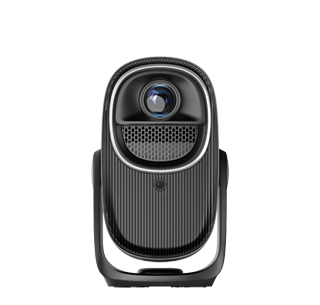
Projectors with multimedia playback are all-in-one projection devices equipped with built-in media players, enabling them to directly play a wide range of content formats (videos, music, documents) without relying on external devices (e.g., PCs, streaming sticks). Unlike basic projectors that function solely as display tools, these models act as self-contained entertainment hubs—supporting USB drives, external hard drives, and network storage (e.g., NAS) to access content. This feature is ideal for casual users (e.g., families playing home videos), travelers (using the projector in hotel rooms with a USB drive), and small businesses (playing promotional videos in lobbies without a dedicated PC).
The core of multimedia playback is broad format support and a powerful built-in media engine. These projectors handle video formats including MP4, MKV, AVI, MOV, and 4K HEVC—critical for playing high-resolution content downloaded from platforms like YouTube or Netflix. Audio playback supports MP3, WAV, FLAC, and Dolby Atmos, with many models featuring built-in speakers (5–20W) or audio output ports (optical S/PDIF, HDMI ARC) to connect to soundbars or surround sound systems. Document support includes PDF, PPT, DOCX, and XLSX—enabling users to play presentations or spreadsheets directly from a USB drive, no laptop needed. Advanced models even support 3D video playback (via HDMI 1.4 or 2.1) for watching 3D movies with compatible glasses, adding a cinematic dimension to home entertainment.
Hardware and software optimizations enhance playback quality. Projectors with dedicated media processing chips (e.g., Amlogic S922X, Rockchip RK3588) ensure smooth playback of high-bitrate content (e.g., 4K videos with 100Mbps bitrates), eliminating buffering or stuttering. Many include “video enhancement” features like HDR10+ decoding (for richer contrast in dark scenes), motion interpolation (for smoother action sequences), and noise reduction (for improving the quality of old home videos). For document playback, “text sharpening” algorithms enhance the readability of small font sizes in PDFs or spreadsheets, while “split-screen playback” lets users display a video and a document simultaneously (e.g., a training video and a quiz).
Practical features simplify content management. Most projectors include a user-friendly media browser—similar to those on smart TVs—with thumbnail previews of videos, photos, and documents, making it easy to navigate large USB drives. Some models support “network playback” via DLNA or SMB, allowing users to access content stored on a PC or NAS without physical drives. “Content scheduling” lets businesses set up automatic playback of promotional videos (e.g., looping a product demo in a store lobby from 9 AM to 9 PM), while “parental controls” enable families to restrict access to age-inappropriate content. The convenience of multimedia playback turns projectors into standalone entertainment centers: a family can plug a USB drive with vacation videos into the projector and enjoy a movie night, while a small business can run promotions without investing in a separate media player.
Read recommendations:
HW45 Home Cinema - HW Series Projector
Digital Zoom Projectors
wireless 1080P home theater projector





















 Reviewed:



