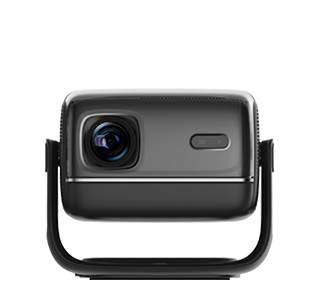
Projectors with wireless keyboard support integrate seamless compatibility with wireless keyboards (Bluetooth or 2.4GHz), enabling users to control the projector’s interface, navigate menus, type text, and manage content without relying on a tiny remote control. Unlike standard projectors (which require cumbersome remote inputs for text entry or menu navigation), these models turn the projector into a more user-friendly “smart device,” ideal for office presentations, home theater setups, or educational environments where text input (e.g., typing URLs, search terms, or presentation notes) is frequent.
The core design of these projectors focuses on connectivity and interface optimization. They support two main wireless keyboard types: Bluetooth keyboards (paired directly via the projector’s Bluetooth settings) and 2.4GHz wireless keyboards (using a USB dongle plugged into the projector’s USB port). The projector’s operating system (often Android-based) is optimized for keyboard input—keys map to common functions (e.g., arrow keys for menu navigation, Enter for selection, Esc for back), and text input fields support full QWERTY typing (eliminating the need for on-screen keyboards). Many models also include mouse support (wireless or Bluetooth), allowing users to control the projector with a keyboard-mouse combo for laptop-like convenience. In terms of projection performance, they offer 1080p/4K resolution, 2000-4000 ANSI lumens, and smart features like streaming apps (Netflix, YouTube) and screen mirroring—all of which are easier to access with a wireless keyboard.
Application scenarios highlight the convenience of keyboard control. In offices, presenters use wireless keyboards to type notes, edit presentation slides (via apps like Google Slides), or search for additional content during meetings—this is far faster than typing with a remote’s on-screen keyboard. In classrooms, teachers use keyboards to type lesson plans, enter student names for attendance, or navigate educational software projected onto a whiteboard, saving time and reducing frustration. For home theater users, wireless keyboards simplify app navigation: typing a movie title into Netflix or searching for a YouTube video is quick and easy, compared to scrolling through on-screen letters with a remote. They’re also useful for gaming: paired with a wireless keyboard, the projector can run Android games that require keyboard controls (e.g., strategy games), enhancing the gaming experience.
When selecting a projector with wireless keyboard support, key factors include connectivity options, OS compatibility, and input lag. Ensure the projector has Bluetooth 5.0+ (for stable keyboard pairing) or a USB-A port (for 2.4GHz dongles). Android-based projectors offer the best keyboard compatibility, as most wireless keyboards are designed for Android systems. Input lag (≤30ms) is important for gaming or fast typing—low lag ensures the projector responds instantly to keyboard presses. Also, check for backlit keyboards if using the projector in dark rooms (e.g., home theaters)—backlit keys make typing easier in low light. With their user-friendly control options, these projectors streamline interaction and boost productivity in diverse settings.
Read recommendations:
HN30A Portable - HN Series Projector
Can Projectors Connect to Bluetooth Speakers?
3d Projector for rooftop movie viewing





















 Reviewed:



