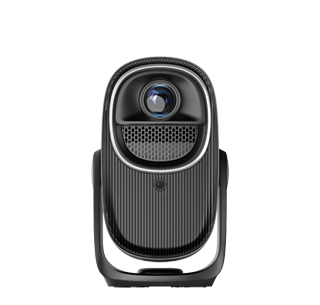
Excessively loud heat dissipation noise is a common problem of many household projectors, especially entry-level and mid-range models, which seriously affects the quiet rest atmosphere of the bedroom. Projectors rely on built-in cooling fans to dissipate heat for the luminous machine and operating chip. Long-term high-load operation will generate wind noise and vibration noise. The noise problem is particularly prominent in the quiet bedroom environment at night, which is easy to interfere with users’ movie watching and sleep quality, and needs to be solved in a targeted manner.
First of all, users can optimize the placement environment and placement method to reduce noise. The projector’s noise will be amplified when placed on uneven, soft or hollow furniture such as beds and wooden cabinets, because the fuselage vibration will resonate with the placement surface. It is recommended to place the projector on a solid and flat desktop, or use a dedicated bracket to fix it, which can effectively eliminate resonance noise. At the same time, ensure that the heat dissipation holes on the left, right and rear of the projector are not blocked by walls, curtains or sundries, to avoid poor heat dissipation leading to high fan speed and increased noise.
Secondly, adjust the projector’s operating mode to reduce the load of the heat dissipation system. Most projectors have multiple modes such as standard mode, high-brightness mode and silent mode. The high-brightness mode will increase the power of the light source and the fan speed, resulting in louder noise. When using in the dark bedroom at night, switch to silent mode or energy-saving mode, which can reduce the fan operating speed on the premise of meeting basic viewing needs, and significantly reduce operating noise.
Finally, regular maintenance can solve the noise problem caused by equipment aging and dust accumulation. Long-term use of the projector will accumulate a lot of dust in the heat dissipation holes and fan blades. Dust accumulation will cause the fan to rotate unbalanced, resulting in increased noise and even abnormal vibration. Users can regularly clean the surface dust of the heat dissipation holes with a dust blower, and disassemble and clean the internal dust appropriately. If the fan is aging and damaged, replace the built-in cooling fan in time to restore the quiet operating state of the projector.
Read recommendations:
HN30B Portable - HN Series Projector
What is the Difference Between CVIA Lumens and ANSI Lumens for Projectors?
KTV Projector Color Saturation





















 Reviewed:



