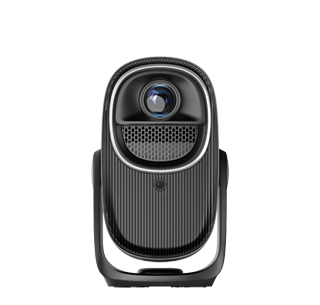
A smart control projector is a technologically advanced projection device equipped with intelligent features that enable remote operation, automated settings adjustment, and integration with smart home or office systems. Unlike traditional projectors that require manual control via a physical remote or buttons, it prioritizes remote accessibility, AI-powered automation, voice control, and smart ecosystem compatibility—making it ideal for modern homes, smart offices, and tech-savvy users who want to streamline their projection experience.
The core features of a smart control projector include remote app control, voice control integration, automated settings adjustment, and smart home/office ecosystem compatibility. Remote app control allows users to operate the projector from their smartphone or tablet via a dedicated app (e.g., BenQ Smart Control, Epson iProjection). The app offers full functionality: turning the projector on/off, adjusting brightness/contrast/volume, switching input sources, navigating streaming apps, and even calibrating the image. Users can control the projector from anywhere in the room (or even outside the room, if the projector is connected to the internet) —no need to hunt for a lost physical remote. For example, someone in the kitchen can turn on the projector and start streaming a recipe video using their phone, then adjust the volume once they’re in the living room.
Voice control integration adds another layer of convenience, with support for popular voice assistants like Amazon Alexa, Google Assistant, and Apple Siri. Users can issue voice commands to control the projector: "Alexa, turn on the living room projector," "Hey Google, switch the projector to HDMI 1," or "Siri, pause the movie on the projector." This is especially useful for hands-full scenarios—cooking while watching a tutorial, or adjusting the projector without leaving the couch. Some models also support custom voice commands, allowing users to create shortcuts for frequently used actions (e.g., "Alexa, start movie night" to turn on the projector, dim the smart lights, and launch Netflix).
Automated settings adjustment uses AI and sensors to optimize the projection experience without manual input. Auto-keystone correction uses built-in sensors to detect the projector’s position and automatically fix distorted images, ensuring a perfectly rectangular display even if the projector is placed off-center. Auto-brightness adjustment measures the room’s ambient light and adjusts the projector’s brightness accordingly—dimming the image in dark rooms to save energy and enhance contrast, and brightening it in well-lit rooms to maintain visibility. Auto-source detection automatically switches to the active input source (e.g., if a laptop is connected via HDMI, the projector switches to HDMI mode without manual selection). These features eliminate the need for tedious manual adjustments, making the projector easy to use for everyone, even those with limited technical skills.
Smart home/office ecosystem compatibility allows the projector to integrate with other smart devices, creating a connected experience. For example, in a smart home, the projector can sync with smart lights (dimming the lights when the projector turns on), smart curtains (closing the curtains for better image quality), and smart soundbars (turning on the soundbar and setting it to the correct input). In a smart office, it can integrate with video conferencing systems (starting a Zoom meeting when the projector turns on) and room booking software (turning off automatically if the room is not booked). This integration streamlines workflows and creates a more cohesive environment.
Other smart features include OTA (Over-the-Air) updates (automatically updating the projector’s firmware with new features and bug fixes), user profiles (saving custom settings for different users or scenarios—e.g., a "Movie Night" profile with low brightness and high contrast, a "Presentation" profile with high brightness and sharp text), and energy-saving modes (automatically turning off the projector if no activity is detected for a set period, reducing energy consumption).
In practical use, smart control projectors simplify daily operation. A smart home user says "Alexa, start movie night"—the projector turns on, the living room lights dim, the curtains close, and Netflix launches automatically. A remote worker uses the BenQ Smart Control app to turn on their office projector from their bedroom, ensuring it’s ready to use when they sit down at their desk. A teacher in a smart classroom uses voice commands to switch the projector from a presentation slide to a video, keeping their hands free to interact with students. For anyone who wants to embrace smart technology and make their projection experience more convenient, a smart control projector is the future of hassle-free, intelligent projection.
Read recommendations:
HW30 Home Cinema - HW Series Projector
sunset Projector customization
MediaTek Projector wholesaler





















 Reviewed:



